


Full Technical SEO Checklist (from Start to Finish)
Table of Contents
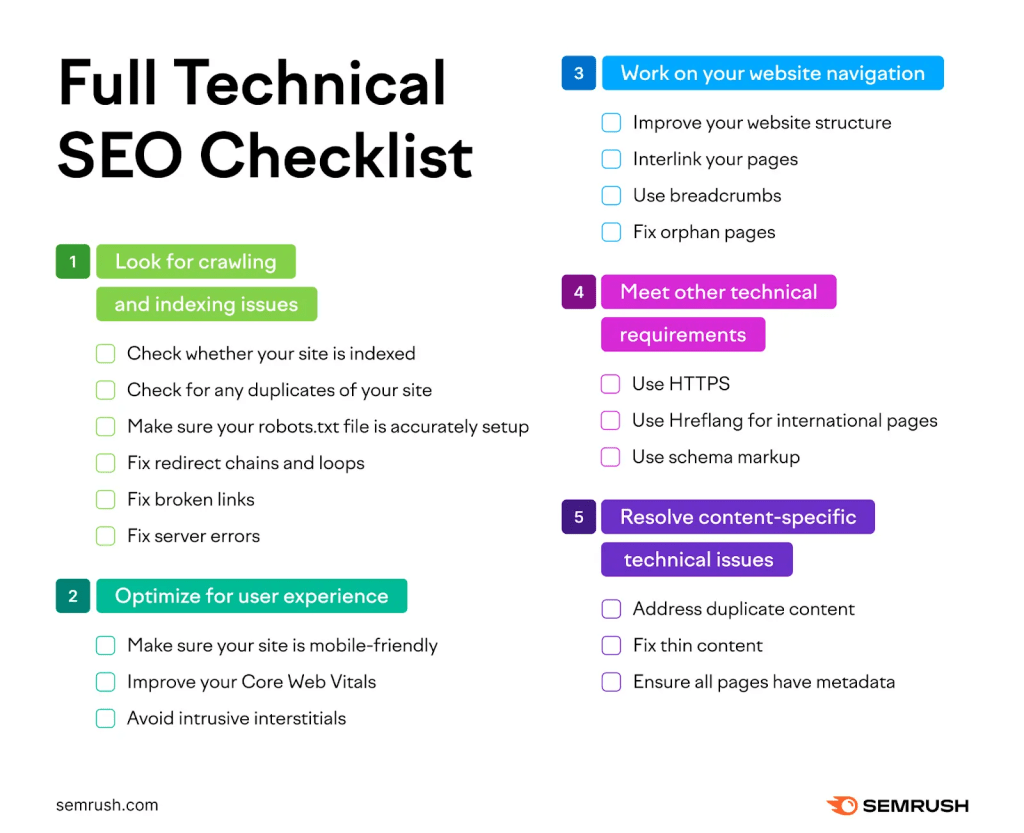
This technical SEO checklist will guide you through every essential step required to identify and fix technical SEO issues, improve crawlability, and strengthen your website’s foundation for higher rankings.
Technical SEO is the behind-the-scenes work that makes your website easy for search engines to find, understand, and rank. Unlike content or keyword strategies, technical SEO focuses on infrastructure, speed, navigation, and overall website health — because if search engines can’t access your site properly, nothing else matters.
A structured technical SEO checklist helps you audit, fix, and optimize foundational elements so that everything else you do — content creation, link-building, user experience — has a solid base to build on.
Let’s walk through the key steps one by one so you can execute a complete technical SEO audit and start improving your search rankings.
1. Look for Crawling and Indexing Issues
Search engines like Google send bots to crawl your site and index it. If they can’t access or index your pages, those pages won’t appear in search results — no matter how well-written your content is.
Check Whether Your Site Is Indexed
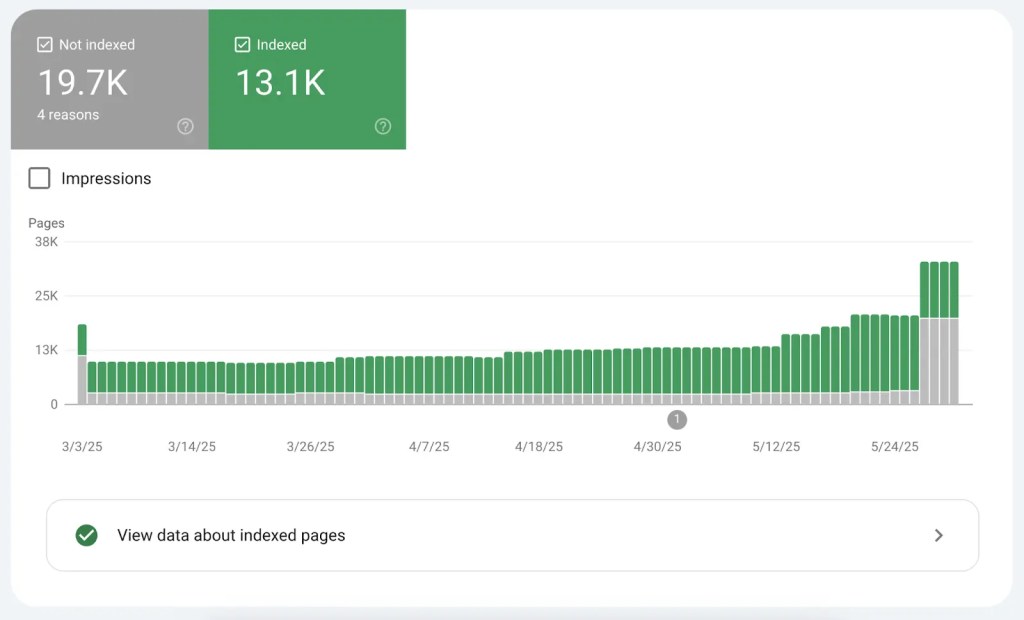
The first thing to verify is whether your pages are being included in search results. You can check this in Google Search Console under the Pages or Index Coverage report. These tools show which URLs are indexed and which are excluded — and why.
Common indexing issues include:
Pages that Google crawled but didn’t index
Pages blocked by your robots.txt file
Pages marked with a
noindextag (which tells search engines not to index them)
Fixing these and then asking Google to re-crawl the updated pages ensures your most important content can appear in search.
Check for Duplicate Versions of Your Website
If your site is reachable via multiple URLs (for example, http:// and https://, or with and without www), search engines may see them as separate sites. Make sure only one version is the canonical (preferred) one, and redirect all others to it.
Inspect Your Robots.txt File
Your robots.txt file tells crawlers which parts of your site they can or cannot access. An incorrect setting might accidentally block important pages. Double-check that any “Disallow” rules are intentional and not preventing search engines from crawling key content.
Fix Redirect Chains and Loops
Redirects are necessary when URLs change, but redirect chains (A → B → C) and loops (A → B → A) waste crawl budget and slow down bots. Simplify these redirects so they point directly to the final destination.
Fix Broken Links
Broken links (leading to 404 errors) harm user experience and can confuse search engines. These can be internal (on your own site) or external (pointing elsewhere), and should either be fixed, redirected, or removed.
Fix Server Errors
Server errors (like 500, 502, 503, and 504 status codes) mean something is wrong server-side. These errors prevent crawlers from accessing your site and must be resolved with your developer or hosting provider.
2. Optimize for User Experience
Search engines reward websites that offer a great user experience (UX). A fast, mobile-friendly site with clear layout and navigation keeps people on your site longer and signals quality to search engines.
Make Sure Your Site Is Mobile-Friendly
Today, search engines primarily use the mobile version of your site for indexing and ranking. Your design must look and function well on phones and smaller screens.
Improve Your Core Web Vitals
Core Web Vitals are a set of metrics that measure real user experience:
Largest Contentful Paint (LCP) — speed of main content loading
Interaction to Next Paint (INP) — responsiveness
Cumulative Layout Shift (CLS) — layout stability
Pages that perform well in these metrics provide smoother UX and are more likely to rank higher.
Avoid Intrusive Interstitials
Aggressive pop-ups that block content disrupt the user experience. Keep any necessary notices (like cookie consent) minimal and unobtrusive.
3. Work on Your Website Navigation
A clear site structure not only helps users find what they need quickly, it also helps search engines understand and crawl your key content paths.
Improve Your Website Structure
Think of your site as a pyramid. Your homepage is at the top, followed by category pages, subcategories, and individual content pages. This logical hierarchy helps bots and people find content efficiently.
Interlink Your Pages
Internal links connect relevant pages and guide crawlers through your site. They also distribute authority and help users discover more content. Use descriptive anchor text rather than generic phrases.
Use Breadcrumbs
Breadcrumb navigation shows users (and search engines) where they are in your site hierarchy and helps improve crawlability — especially for complex, multi-layer sites.
Fix Orphan Pages
Orphan pages have no internal links pointing to them, making them hard for users and search engines to find. Adding relevant internal links brings these pages into your site’s discoverable structure.
4. Meet Other Technical Requirements
There are several other foundational best practices every technical SEO audit should cover.
Use HTTPS
HTTPS encrypts communication between the browser and server, protects user data, and is now a small ranking factor. If your site isn’t already secure, implement an SSL certificate.
Implement Hreflang for International Pages
If your site targets multiple countries or languages, hreflang tags tell search engines which version of a page should be shown to users in a specific region or language.
Add Schema Markup
Schema markup helps search engines better understand the meaning of your content and can result in rich results in SERPs (like review stars, FAQs, or event info).
5. Resolve Content-Specific Technical Issues
Even with perfect infrastructure, specific content problems can hold your SEO back. A final phase of the checklist focuses on issues that are both technical and content-related.
Address Duplicate Content
Duplicate content confuses search engines and dilutes ranking potential. Use canonical tags to designate the primary version of a page and redirect duplicates to it.
Fix Thin Content
Pages that offer little value or substance can drag down performance. Either expand thin content with meaningful material or remove it if it doesn’t serve a clear purpose.
Ensure All Pages Have Metadata
Metadata — title tags and meta descriptions — tells search engines and users what a page is about. Missing or poorly written metadata can reduce visibility and click-through rates, so audit and optimize these elements across your site.
Put This Technical SEO Audit Checklist Into Action
Now that you know all the key steps, it’s time to execute. Use tools like Google Search Console and Semrush’s Site Audit to uncover issues, then fix them methodically.
A strong technical SEO foundation doesn’t just improve your rankings — it makes your website more user-friendly, reliable, and trustworthy.
Frequently Asked Questions About Technical SEO
What is a technical SEO checklist?
A technical SEO checklist is a structured process used to audit and fix crawl, indexing, performance, and structural issues on a website.
How often should you run a technical SEO audit?
At least quarterly, or after major site updates.
Is technical SEO more important than content?
Technical SEO builds the foundation. Without it, content cannot perform properly.

About the Author
Nicky Huseynova
Founder & CEO, Optimum DMA
Nicky Huseynova is the Founder and CEO of Optimum DMA, a digital marketing agency focused on helping service-based businesses grow through strategic websites, SEO, and content marketing. She has worked with hundreds of U.S.-based businesses across a wide range of industries and has successfully led the launch of hundreds of websites.
Her work combines clear strategy, thoughtful execution, and a strong understanding of how people search, think, and make decisions online. From website development to SEO and content marketing systems, Nicky helps businesses build visibility, trust, and long-term growth.
 Connect on LinkedIn
Read Other Pro Tips

The Content Roadmap 2026: A Monthly SEO & Content Guide for Growing Professional Firms
Nicky H.
March 24, 2026



Local SEO for Law Firms: How to Show Up When Clients Search “Near Me”
Nicky H.
March 11, 2026

Blogging for Consultants: Build Authority & Attract Clients in 2026
Nicky H.
March 9, 2026
Whether you need a new website, SEO, or content strategy — we’re here to help.
We typically respond within 24 hours.
- 646-262-1142
- nicky@optimumdma.com
- Hell's Kitchen, NY 10019